


This section details information about all Celiveo 365 components and protocols/ports used to access services and endpoints for day-to-day and one-time operations.
Celiveo 365 Infrastructure Diagram
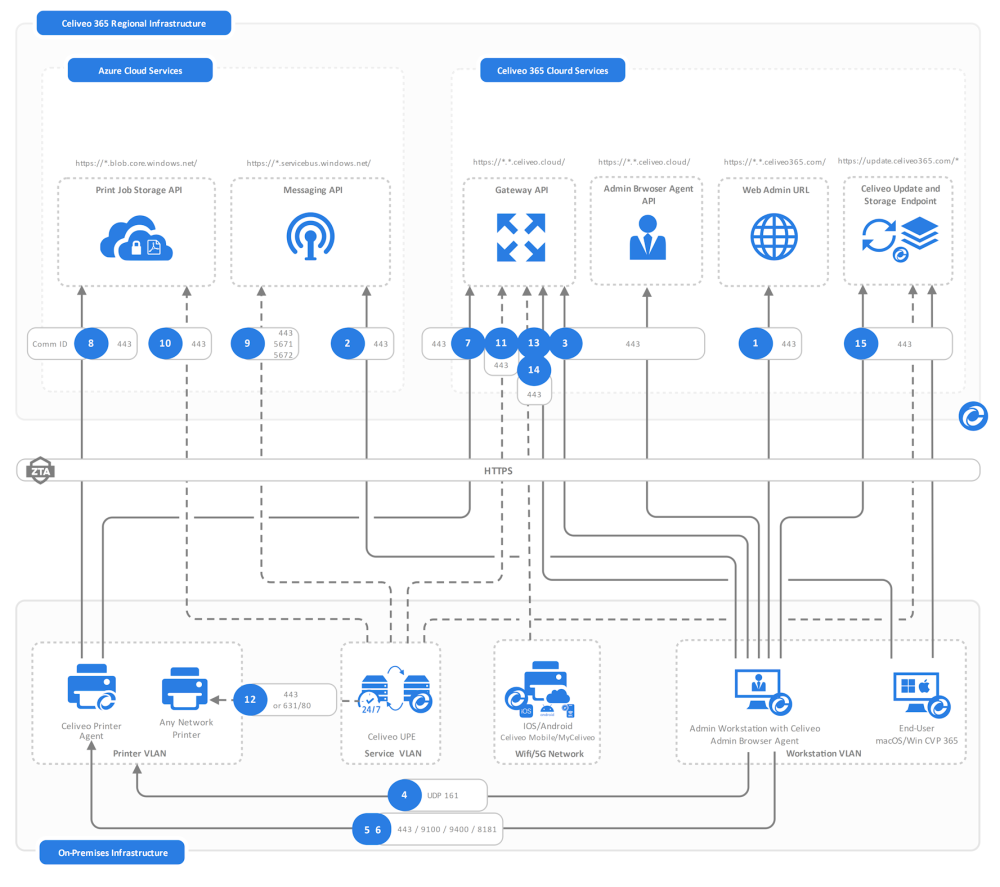
Ports and Communications Overview
| Comm ID | Origin | Origin Service Name | Destination | Destination Endpoint | Destination Port | Protocol | Content | Description |
|---|---|---|---|---|---|---|---|---|
| 1 | On-Prem Celiveo 365 Administrator WorkstationOnly active when the admin is adding/configuring cloud print queues and printers/MFPs |
Web Browser (Edge/Chrome) | Public Cloud Celiveo 365 Cloud Services |
https://*.*.celiveo365.com/ | 443 | HTTPS | TLS 1.2 | Used to login to Web Admin and manage solution. |
| 2 | On-Prem Celiveo 365 Administrator WorkstationOnly active when the admin is adding/configuring cloud print queues and printers/MFPs |
Celiveo Browser Agent Service.exe | Public Cloud Azure Cloud Services |
https://*.servicebus.windows.net/ | 443 | HTTPS | TLS 1.2 | Used by Celiveo Admin Browser Agent to get action notifications from Azure like Trigger Sync Process or Delete Printer. |
| 3 | Public Cloud Celiveo 365 Cloud Services |
https://*.*.celiveo.cloud/ | 443 | HTTPS | TLS 1.2 | Upload Printer information, download Printer Agent and configuration | ||
| 15 | https://update.celiveo365.cc/file/celiveoupdates/* | 443 | HTTPS | TLS 1.2 | Used for ABA Auto-Update | |||
| 4 | On-Prem Printer/MFP on the LAN |
n/a | 161 | UDP | SNMP v 1/2/3 | Used by SNMP to retrieve printer information | ||
| 5 | n/a | 9400 / 443 / 9100 | TCP/HTTPS | TLS 1.2 | Used for loading Celiveo Embedded Agent and its configuration | |||
| 6 | On-Prem Celiveo Printer Agent |
n/a | 8181 | TCP | TLS 1.2 | Used to collect the Printer Embedded Agent encrypted logs | ||
| 7 | On-Prem Printer/MFP |
Celiveo Printer Agent running in the printer | Public Cloud Celiveo 365 Cloud Services |
https://*.*.celiveo.cloud/ | 443 | HTTPS | TLS 1.2 | Any communication between Printer Agent and the Celiveo 365 Cloud services. Used for Authentication, Job Delete, and Tracking |
| 8 | Public Cloud Azure Cloud Services |
https://*.blob.core.windows.net/ | 443 | HTTPS | TLS 1.2 | Used by Celiveo Printer Agent to download encrypted Print Jobs from Celiveo 365 | ||
| Section only applicable for customers using printers not supporting the Celiveo embedded agent, Xerox printers or using mobile/NFC print jobs release | ||||||||
| 9 | On-Prem Celiveo UPE service (Universal Printer Endpoint) Provides mobile and NFC print release for older printers. |
Celiveo Universal Printer Endpoint Agent | Public Cloud Azure Cloud Services |
https://*.servicebus.windows.net/ | 443 or 5671/5672 | HTTPS | TLS 1.2 | Used by Celiveo Universal Printer Endpoint Agent to get action notifications from Azure |
| 10 | https://*.blob.core.windows.net/ | 443 | HTTPS | TLS 1.2 | Used by UPE to download encrypted Print Jobs from Celiveo 365 | |||
| 11 | Public Cloud Celiveo 365 Cloud Services |
https://*.*.celiveo.cloud/ | 443 | HTTPS | TLS 1.2 | Used for heartbeat status and Print Job Tracking data | ||
| 15 | https://update.celiveo365.cc/file/celiveoupdates/* | 443 | HTTPS | TLS 1.2 | Used for UPE Auto-Update | |||
| 12 | On-Prem Printer/MFP |
n/a | 443 or 631/80 | HTTPS/IPPS HTTP/IPP | TLS 1.2 when using IPPS/HTTPS | UPE redirects Print Job to target printer via IPPS/HTTPS or in failover to IPP/HTTP (Depends on device configuration) | ||
| 13 | On-Prem / Internet Mobile (iOS, Android) |
Celiveo Print Mobile | Public Cloud Celiveo 365 Cloud Services |
https://*.*.celiveo.cloud/ | 443 | HTTPS | TLS 1.2 | Used for regional placement identification |
| 14 | Used for Print Job submission | |||||||
| Section only applicable for customers using macOS Celiveo Virtual Printer 365 | ||||||||
| 13 | On-Prem macOS Workstation |
Celiveo CVP 365 | Public Cloud Celiveo 365 Cloud Services |
https://*.*.celiveo.cloud/ | 443 | HTTPS | TLS 1.2 | Used for regional placement identification |
| 14 | Used for Print Job submission | |||||||
| Section only applicable for customers using Windows Celiveo Virtual Printer 365 | ||||||||
| 13 | On-Prem Windows Workstation |
Celiveo CVP 365 | Public Cloud Celiveo 365 Cloud Services |
https://*.*.celiveo.cloud/ | 443 | HTTPS | TLS 1.2 | Used for regional placement identification |
| 14 | Used for Print Job submission | |||||||
| 15 | https://update.celiveo365.cc/file/celiveoupdates/* | Used for WinCVP 365 Auto-Update | ||||||
| 15 | https://update.celiveo365.cc/file/cvo-wincvp-artifacts/* | Used for Print Driver & Settings Download | ||||||
| 16 | On-Prem Printer/MFP |
AppSocket (RAW Print Port) | 9100 | TCP | n/a | WinCVP sends documents directly to the target printer in Print-Direct mode | ||
Celiveo 365 Regional Endpoints
To identify your subscription region login to https://subscribe.celiveo365.com/ go to Dashboard > Subscription > Region
Celiveo operating regions: EU (France), USA (USA South Central), MX (Mexico), SG (Singapore).
To identify your < tenant name > login to https://subscribe.celiveo365.com/, go to Dashboard > Subscription > Region.
Inside Region there’s a complete Celiveo 365 URL where is the first part of the URL followed by .celiveo365.com eg: https://evolice.celiveo365.com further information regarding the tenant name at step 7 of the subscription process..
| Comm ID | Origin | Full Destination Endpoint |
|---|---|---|
| Endpoints region: EU (France) | ||
| 1 | Web Browser (Admin Workstation VLAN) | https://< tenant name >.eu.celiveo365.com/* |
| 2 | Celiveo Admin Browser Agent (Admin Workstation VLAN) | https://sb-c365-prd-eu.servicebus.windows.net/* |
| 3 | https://< tenant name >.eu-aba6575.celiveo.cloud/* | |
| 3 | https://< tenant name >.eu-gateway6575.celiveo.cloud/* | |
| 15 | https://update.celiveo365.cc/file/celiveoupdates/* | |
| 7 | Celiveo Printer Agent (Printer VLAN) | https://< tenant name >.eu-gateway6575.celiveo.cloud/* |
| 7 | https://< tenant name >.eu-gatewayx6575.celiveo.cloud/* (Xerox Devices Only) | |
| 8 | https://cvoblobeuprd.blob.core.windows.net/* | |
| 9 | Celiveo Universal Printer Endpoint Agent | https://sbq-c365-print-prd-eu.servicebus.windows.net/* |
| 15 | https://update.celiveo365.cc/file/celiveoupdates/* | |
| 10 | Celiveo Universal Printer Endpoint Agent | https://cvoblobeuprd.blob.core.windows.net/* |
| 11 | Celiveo Universal Printer Endpoint Agent | https://< tenant name >.eu-gateway6575.celiveo.cloud/* |
| 12 | Celiveo Universal Printer Endpoint Agent (Reachability to Printer VLAN) | http[s]://< Printer-IP-address >[:631|:443]/* |
| 13 | Celiveo Print Mobile (Smartphone) / Celiveo Virtual Printer – Win/macOS Devices | https://common.eu-gateway6575.celiveo.cloud/* |
| 14 | Celiveo Print Mobile (Smartphone) / Celiveo Virtual Printer – Win/macOS Devices | https://< tenant name >.eu-gateway6575.celiveo.cloud/* |
| 15 | Celiveo Virtual Printer (winCVP only) | https://update.celiveo365.cc/file/celiveoupdates/* |
| Endpoints region: USA | ||
| 1 | Web Browser (Admin Workstation VLAN) | https://< tenant name >.us.celiveo365.com/* |
| 2 | Celiveo Admin Browser Agent (Admin Workstation VLAN) | https://sb-c365-prd-us.servicebus.windows.net/* |
| 3 | https://< tenant name >.us-aba7573.celiveo.cloud/* | |
| 3 | https://< tenant name >.us-gateway7573.celiveo.cloud/* | |
| 7 | Celiveo Printer Agent (Printer VLAN) | https://< tenant name >.us-gateway7573.celiveo.cloud/* |
| 7 | https://< tenant name >.us-gatewayx7573.celiveo.cloud/* (Xerox Devices Only) | |
| 8 | https://cvoblobusprd.blob.core.windows.net/* | |
| 9 | Celiveo Universal Printer Endpoint Agent | https://sbq-c365-print-prd-us.servicebus.windows.net/* |
| 10 | Celiveo Universal Printer Endpoint Agent | https://cvoblobusprd.blob.core.windows.net/* |
| 11 | Celiveo Universal Printer Endpoint Agent | https://< tenant name >.us-gateway7573.celiveo.cloud/* |
| 12 | Celiveo Universal Printer Endpoint Agent (Reachability to Printer VLAN) | http[s]://< Printer-IP-address >[:631|:443]/* |
| 13 | Celiveo Print Mobile (Smartphone) / Celiveo Virtual Printer – Win/macOS Devices | https://common.us-gateway7573.celiveo.cloud/* |
| 14 | Celiveo Print Mobile (Smartphone) / Celiveo Virtual Printer – Win/macOS Devices | https://< tenant name >.us-gateway7573.celiveo.cloud/* |
| 15 | Celiveo Virtual Printer (winCVP only) | https://update.celiveo365.cc/file/celiveoupdates/* |
| Endpoints region: SG (Singapore) | ||
| 1 | Web Browser (Admin Workstation VLAN) | https://< tenant name >.sg.celiveo365.com/* |
| 2 | Celiveo Admin Browser Agent (Admin Workstation VLAN) | https://sg-c365-prd.servicebus.windows.net/* |
| 3 | https://< tenant name >.sg-aba7367.celiveo.cloud/* | |
| 3 | https://< tenant name >.sg-gateway7367.celiveo.cloud/* | |
| 7 | Celiveo Printer Agent (Printer VLAN) | https://< tenant name >.sg-gateway7367.celiveo.cloud/* |
| 7 | https://< tenant name >.sg-gatewayx7367.celiveo.cloud/* (Xerox Devices Only) | |
| 8 | https://cvoprdblob.blob.core.windows.net/* | |
| 9 | Celiveo Universal Printer Endpoint Agent | https://sbq-c365-print-prd-sg.servicebus.windows.net/* |
| 10 | Celiveo Universal Printer Endpoint Agent | https://cvoprdblob.blob.core.windows.net/* |
| 11 | Celiveo Universal Printer Endpoint Agent | https://< tenant name >.sg-gateway7367.celiveo.cloud/* |
| 12 | Celiveo Universal Printer Endpoint Agent (Reachability to Printer VLAN) | http[s]://< Printer-IP-address >[:631|:443]/* |
| 13 | Celiveo Print Mobile (Smartphone) / Celiveo Virtual Printer – Win/macOS Devices | https://common.sg-gateway7367.celiveo.cloud/* |
| 14 | Celiveo Print Mobile (Smartphone) / Celiveo Virtual Printer – Win/macOS Devices | https://< tenant name >.sg-gateway7367.celiveo.cloud/* |
| 15 | Celiveo Virtual Printer (winCVP only) | https://update.celiveo365.cc/file/celiveoupdates/* |
| Endpoints region: MX (Mexico) | ||
| 1 | Web Browser (Admin Workstation VLAN) | https://< tenant name >.mx.celiveo365.com/* |
| 2 | Celiveo Admin Browser Agent (Admin Workstation VLAN) | https://sb-c365-prd-mx.servicebus.windows.net/* |
| 3 | https://< tenant name >.mx-aba6d78.celiveo.cloud/* | |
| 3 | https://< tenant name >.mx-gateway6d78.celiveo.cloud/* | |
| 7 | Celiveo Printer Agent (Printer VLAN) | https://< tenant name >.mx-gateway6d78.celiveo.cloud/* |
| 7 | https://< tenant name >.mx-gatewayx6d78.celiveo.cloud/* (Xerox Devices Only) | |
| 8 | https://cvoblobmxprd.blob.core.windows.net/* | |
| 9 | Celiveo Universal Printer Endpoint Agent | https://sbq-c365-print-prd-mx.servicebus.windows.net/* |
| 10 | Celiveo Universal Printer Endpoint Agent | https://cvoblobmxprd.blob.core.windows.net/* |
| 11 | Celiveo Universal Printer Endpoint Agent | https://< tenant name >.mx-gateway6d78.celiveo.cloud/* |
| 12 | Celiveo Universal Printer Endpoint Agent (Reachability to Printer VLAN) | http[s]://< Printer-IP-address >[:631|:443]/* |
| 13 | Celiveo Print Mobile (Smartphone) / Celiveo Virtual Printer – Win/macOS Devices | https://common.mx-gateway6d78.celiveo.cloud/* |
| 14 | Celiveo Print Mobile (Smartphone) / Celiveo Virtual Printer – Win/macOS Devices | https://< tenant name >.mx-gateway6d78.celiveo.cloud/* |
| 15 | Celiveo Virtual Printer (winCVP only) | https://update.celiveo365.cc/file/celiveoupdates/* |
Network TLS Inspection and Celiveo 365 Certificate Validation
Celiveo 365 enforces Zero Trust Architecture (ZTA) on all outbound connections from its modules (ABA, Printer Agent, winCVP/macCVP, UPE) to the cloud gateway endpoints. As part of this, each module validates (pins) the server’s TLS certificate during the handshake, before any data is sent.
Some corporate network security appliances perform TLS/SSL inspection. When active on the network path, such an appliance intercepts the connection and presents its own certificate to the connecting client instead of forwarding the original Celiveo server certificate.
Important: The module never reaches the Celiveo API in this situation. The connection is aborted by the module during the TLS handshake, on the client side, as soon as it detects that the presented certificate does not match the expected Celiveo issued certificate – unique per customer. No request is sent and no data is exchanged. The Celiveo cloud API is not involved and will not log any trace of the attempt as the connection is refused during TLS handshake.
How to identify this situation
In the Admin Browser Agent (ABA), open the Start Diagnostics tool. A failed connection caused by TLS inspection shows the following in the Token Response section:
[Error] System.Net.Http.HttpRequestException: The SSL connection could not be established, see inner exception.
---> System.Security.Authentication.AuthenticationException: The remote certificate was rejected by the provided RemoteCertificateValidationCallback.
The key indicator is RemoteCertificateValidationCallback: the client rejected the server certificate it was presented, meaning a device on the network path replaced the Celiveo certificate with its own.
Note: Adding the inspection appliance’s CA certificate to the client trust store does not resolve this. The modules pin the specific Celiveo certificate, and where mutual TLS (mTLS) is used they also present a client certificate the appliance cannot forward to Celiveo. A true decryption bypass is required.
Security products that cause this, and how to resolve it
TLS inspection is performed by enterprise security appliances (also called “SSL Decryption”, “HTTPS Inspection”, or “SSL Forward Proxy”). If any of the products below is deployed on the path used by Celiveo modules, configure it to bypass/exempt the Celiveo 365 gateway endpoints. Product and feature names change over time, so use the feature name as your search term in the vendor console.
Cloud SASE / SSE & Secure Web Gateways (SWG) – intercept internet-bound traffic from local agents:
| Vendor | Product | Feature to search for |
|---|---|---|
| Zscaler | Internet Access (ZIA) | SSL Inspection |
| Netskope | Netskope One | SSL Decryption |
| Cloudflare | Cloudflare One / Gateway | TLS Decryption |
| Cisco | Umbrella Secure Web Gateway | SSL Decryption |
| Broadcom / Symantec | Web Security Service / Blue Coat ProxySG | SSL Interception / SSL Forward Proxy |
| Skyhigh Security | formerly McAfee Web Gateway | SSL Decryption |
| Forcepoint | Forcepoint ONE / Web Security | SSL Decryption |
| iboss | iboss Cloud Platform | HTTPS Decryption |
Next-Generation Firewalls (NGFW) / UTM – inspect traffic at the network boundary:
| Vendor | Product | Feature to search for |
|---|---|---|
| Palo Alto Networks | PAN-OS / Prisma Access | SSL Forward Proxy Decryption |
| Fortinet | FortiGate | Deep SSL Inspection / SSL/SSH Inspection Profile |
| Check Point | Quantum | HTTPS Inspection |
| Cisco | Secure Firewall (formerly Firepower / ASA) | SSL Decryption Policy |
| Sophos | Sophos Firewall / XG | SSL/TLS Inspection |
| SonicWall | TZ / NSa | DPI-SSL |
| Barracuda | CloudGen Firewall | SSL Inspection |
| WatchGuard | Firebox | HTTPS Content Inspection |
Open source / software proxies:
| Vendor | Product | Feature to search for |
|---|---|---|
| Squid | Squid Proxy | SslBump |
| pfSense / OPNsense | (Squid package) | Squid SSL Interception |
Where to apply the bypass
In some cases the bypass can be set on the workstation itself. For a broader configuration, apply it on the network segment or device where the Celiveo modules actually run, for example:
- Printer VLAN – where a printer runs the Celiveo Printer Agent.
- Laptop VLAN – where a laptop runs winCVP/macCVP or the Admin Browser Agent (ABA).
- Service VLAN – where a service machine runs UPE.
Post your comment on this topic.